Cleaning Electronics and Screens Safely: Surface Chemistry and Coating Protection
Table of Contents
Things You'll Learn From This Article:
- Screens aren’t just glass; they have ultra-thin coatings that can be permanently damaged by the wrong cleaner or cloth.
- Household glass cleaners with ammonia will ruin screen coatings and cause cloudy spots and more glare.
- Strong alcohol cleaners remove fingerprint-repelling layers, making screens get dirty faster and potentially causing deeper damage over time.
- A good microfiber cloth matters—high-density (high-GSM) cloths trap dust safely instead of dragging it across the screen.
- Cheap cloths or cotton rags can scratch screens because dirt stays on the surface instead of being pulled into the fibers.
- Dry wiping with the right microfiber cloth is usually enough for everyday smudges.
- When water is needed, distilled water is safer than tap water because it doesn’t leave mineral residue.
- If a cleaner is required, coating-safe screen cleaners use gentle, plant-based ingredients instead of harsh chemicals.
- Spraying liquid directly on a device is risky because it can seep inside and damage electronics.
- Always spray cleaner onto the cloth first, then wipe the screen gently.
- Cleaning and sanitizing aren’t the same—something can look clean and still have bacteria on it.
- Repeated alcohol wiping may disinfect but slowly destroys fingerprint-resistant coatings.
- UV-C phone sanitizers can reduce germs without touching or wearing down screen coatings.
- Dust and lint in keyboards and ports should be removed with compressed air or soft, non-conductive tools.
- Using a regular vacuum on electronics can cause static discharge and damage internal components.
- Large screens attract dust because of static electricity, not just because they’re dirty.
- Anti-static cloths and sprays help reduce how quickly dust comes back.
- Keeping indoor humidity around 40–50% helps prevent static buildup on screens.
- Cleaning less often—but more carefully—reduces long-term wear on delicate screen coatings.
- Treating electronics like precision equipment helps them stay clear, responsive, and usable for much longer.
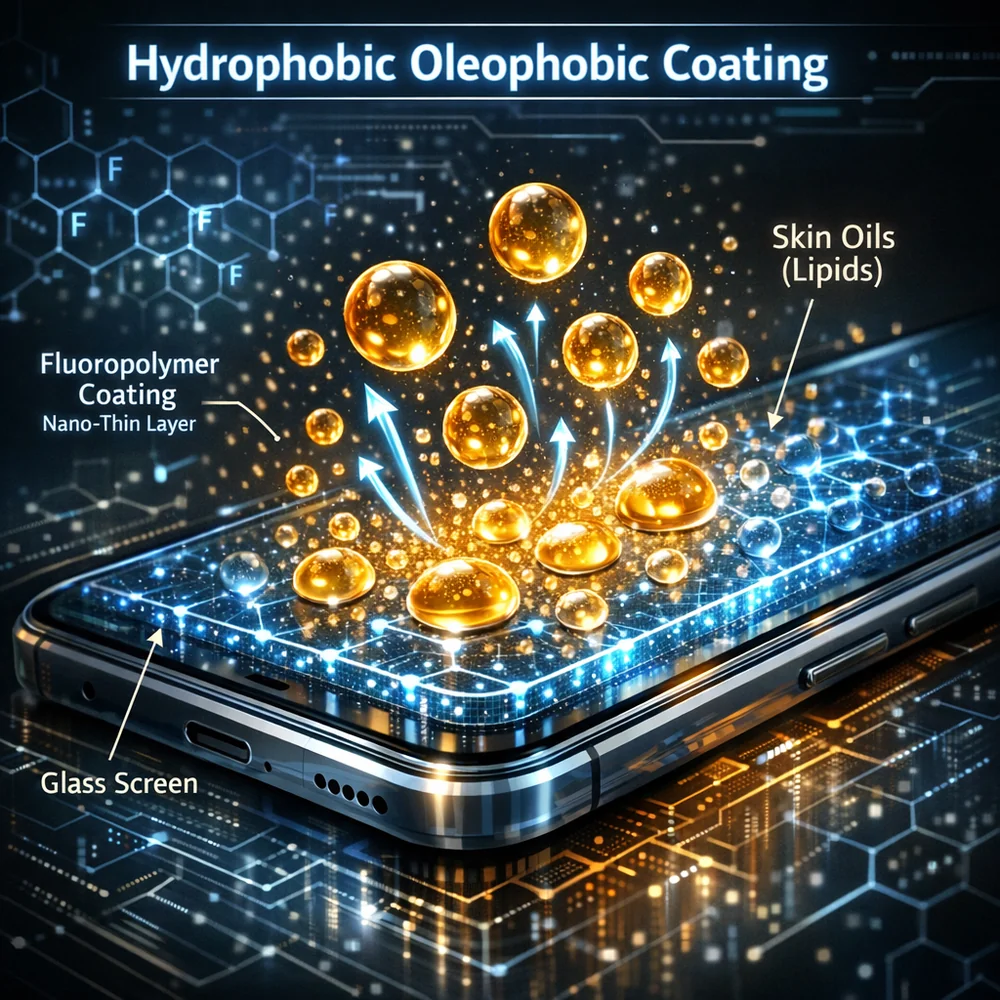
Cleaning your phone, laptop, or TV screen isn’t the same as wiping down a window. Modern displays are covered with sophisticated thin-film coatings that manage how light behaves. We’re talking anti-reflective layers, anti-glare treatments, and oleophobic coatings that repel fingerprints. These films are typically only a few nanometers thick, and they’re incredibly fragile.
Use the wrong cleaner, and you’ll permanently damage these coatings. The result? Cloudy spots, increased glare, and on touchscreens, potentially losing touch sensitivity altogether.
Traditional household cleaners are absolutely off-limits for screens. The chemicals that work great on glass and countertops will chemically attack these nano-scale polymer layers. This guide covers what actually works for cleaning electronics safely, from choosing the right cloths to understanding why your standard glass cleaner could ruin an expensive display. Your devices are precision optical instruments, and they deserve care that matches their value.
Why Ammonia and Alcohol Are Screen Killers
The most common mistake in electronics cleaning is reaching for ammonia-based window cleaners. Ammonia is a strong base that rapidly eats through the polymer binders in anti-glare coatings. Once it starts this chemical attack, the coating flakes off permanently. There’s no fixing it. Your screen ends up with worse glare and a visible reduction in contrast ratio.
This type of chemical etching is similar to what happens when you use the wrong cleaner on natural stone countertops. The damage is permanent and progressive.
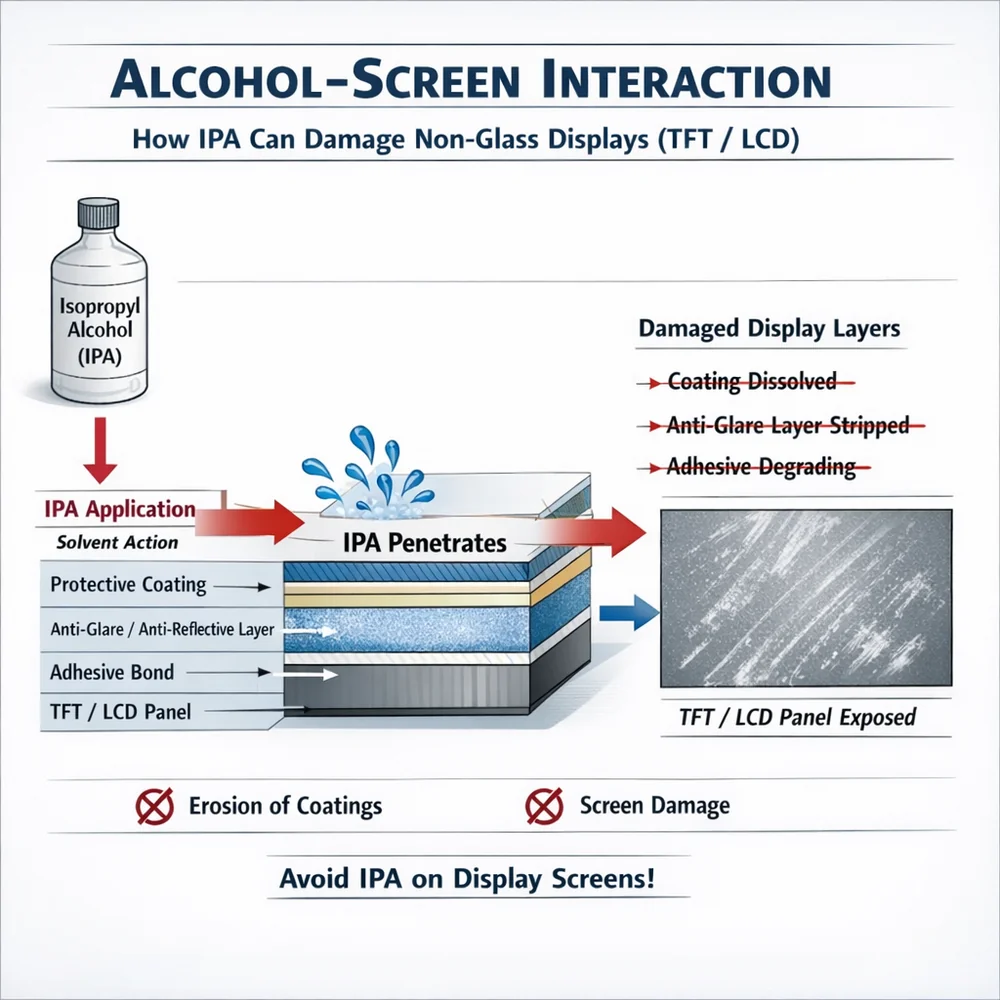
High-concentration isopropyl alcohol creates a different problem. While alcohol dissolves the oils from fingerprints beautifully, it also strips away the oleophobic molecules that make your screen resist fingerprints in the first place. Once that layer is gone, your screen becomes a permanent smudge magnet. Even worse, alcohol can penetrate edge seals on some displays and cause internal polarizer delamination. Many manufacturers explicitly forbid any alcohol-based cleaners on their devices. If you absolutely need a solvent, use only highly diluted anhydrous isopropyl alcohol applied to a cloth, never sprayed directly on the screen.
Key Insight: Ammonia and high-concentration alcohols act as powerful chemical solvents that can permanently dissolve or hydrolyze the nano-scale anti-glare and oleophobic coatings on modern displays. Preserving these optical layers requires the complete exclusion of harsh bases and the strict limitation of volatile organic solvents.
Microfiber Quality: Why GSM Matters for Screens
Now that you know what chemicals to avoid, let’s talk about the physical side of cleaning. Screens are extremely sensitive to micro-scratching, which means the cloth you use matters as much as what you put on it. Not all microfiber cloths are suitable for electronics care.
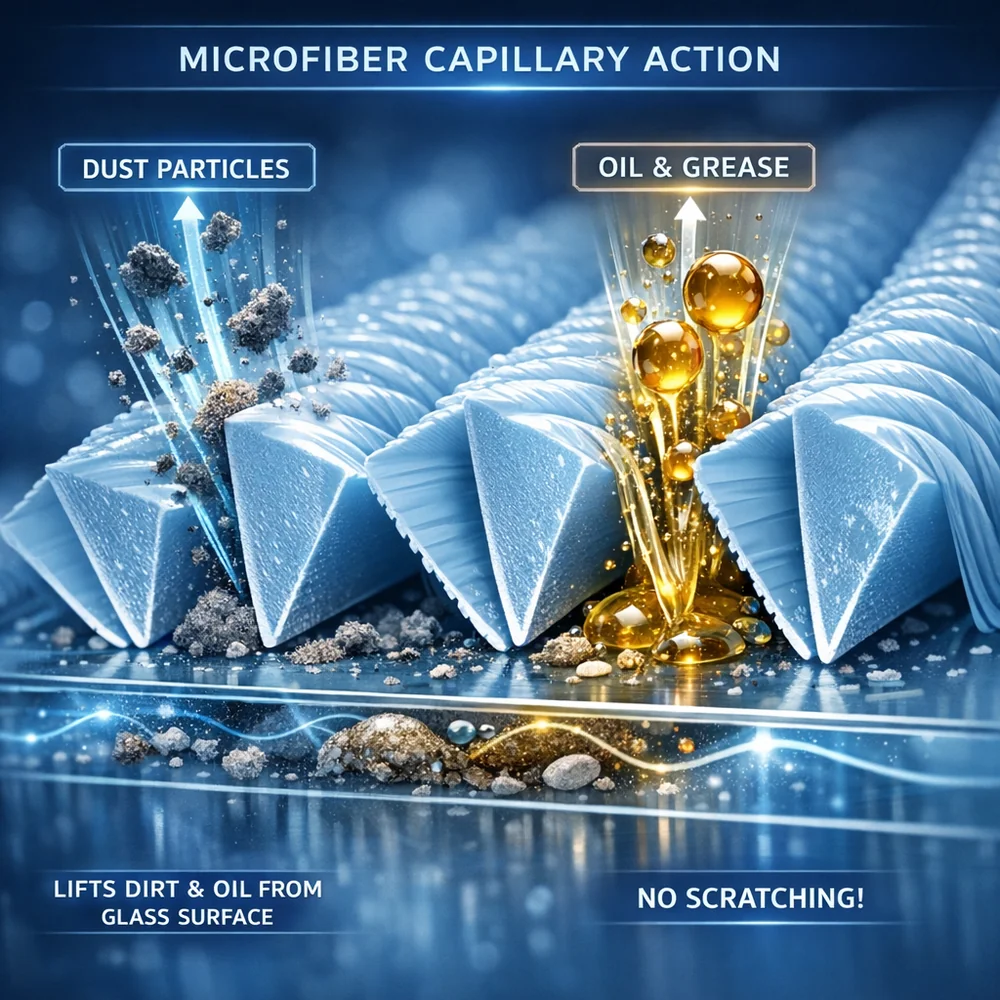
GSM, which stands for grams per square meter, measures the density of the microfiber weave. For delicate screens, you want high-GSM suede microfiber with an extremely dense weave of ultra-fine fibers. These cloths lift oils through Van der Waals forces, the same molecular-level attraction that lets geckos climb walls. No chemicals needed.
High-GSM cloths also pull dust particles deep into the fiber matrix, away from the surface where they could scratch.
Low-GSM cloths and cotton rags are dangerous because they lack this storage capacity. A single grain of dust gets trapped against the fiber and dragged across the screen, leaving a permanent scratch. For that perfect streak-free finish on displays, invest in quality cloths and wash them regularly to clear out accumulated particles.
Key Insight: Microfiber density, measured in GSM, dictates a cloth’s ability to trap abrasive particulates away from the screen surface. High-GSM, flat-weave textiles minimize mechanical friction and swirl marks, allowing for the dry removal of lipids through molecular-level contact.
Safe Wet Cleaning: Plant-Based Surfactant Solutions
Sometimes a dry cloth isn’t enough for stubborn fingerprints. When you need to go wet, the key is finding cleaners that won’t react with display polymers. Modern coating-safe screen cleaners use plant-based non-ionic surfactants derived from natural sugars. Unlike ionic surfactants, these are chemically stable with a neutral pH.
These cleaners work by reducing the surface tension of oily soil, allowing it to lift into the cloth. High-end formulas also use colloidal micelle technology: microscopic particles that trap oils within their core like tiny magnets.
For more on how these work, check our plant-based detergent guide. Whatever cleaner you choose, make absolutely sure it’s free from volatile organic compounds. Fragrances are often made from essential oils that leave residue films. A high-purity surfactant solution gives you safe wet cleaning without risking coating damage.
Key Insight: Plant-derived non-ionic surfactants and colloidal micelle technology provide a low-energy chemical path for emulsifying fingerprints without attacking display coatings. These pH-neutral, fragrance-free formulas achieve a “zero-residual” state that maintains the screen’s intended optical properties.
Smartphone Hygiene: Cleaning and Sanitizing Mobile Devices
With cleaning products covered, let’s address the specific challenge of smartphones. Your phone is touched constantly throughout the day, accumulating skin oils, dead skin cells, and bacteria at levels that often exceed toilet seats. Removing this biological load is about hygiene as much as aesthetics.
Start with a dry, high-GSM microfiber cloth for everyday cleaning. Most daily smudges come off with just the mechanical action.
For persistent fingerprints, dampen the cloth with distilled water only. Distilled water leaves no mineral residue. But here’s the thing: cleaning and sanitizing are different. A clean-looking screen can still be crawling with bacteria. While 70% isopropyl alcohol kills pathogens effectively, it also degrades oleophobic coatings with repeated use. A safer alternative is a UV-C sanitizing chamber, which uses 254nm ultraviolet light to disrupt bacterial DNA without touching the phone’s coatings. This is the same photolytic kill mechanism used in medical settings.
Key Insight: Modern smartphone screens utilize oleophobic coatings that are highly sensitive to chemical stripping. A “dry-first” microfiber protocol combined with UV-C sanitization provides a safe, non-degradative path for managing both aesthetic smudges and pathogenic loads.
Keyboard and Port Cleaning: Extracting Debris Safely
Moving beyond screens, keyboards and ports are magnets for mechanical contamination. Dust and skin cells fall between keys. Lint from pockets packs into charging ports and blocks connections. Getting this debris out requires care because you’re working near sensitive internal circuitry.
Compressed air or an electric duster works best for keyboards. Use short bursts at a shallow angle to blow particulates out of the gaps.
For more stubborn soil, cleaning gel can be pressed onto keys to pull particles out. It conforms to the shapes and lifts debris without scratching. Never use a standard vacuum on a keyboard. The airflow generates static electricity that can discharge and damage sensitive logic boards underneath. For ports, use non-conductive tools like wooden toothpicks or plastic spudgers. Reference our cleaning tools guide for material recommendations.
Key Insight: Debris in keyboards and ports causes mechanical and electrical failure. Safe restoration requires non-conductive mechanical extraction and the use of “air-blow” techniques to avoid the risks of electrostatic discharge (ESD) and port short-circuiting.
Static Control: Reducing Dust Attraction on Large Displays
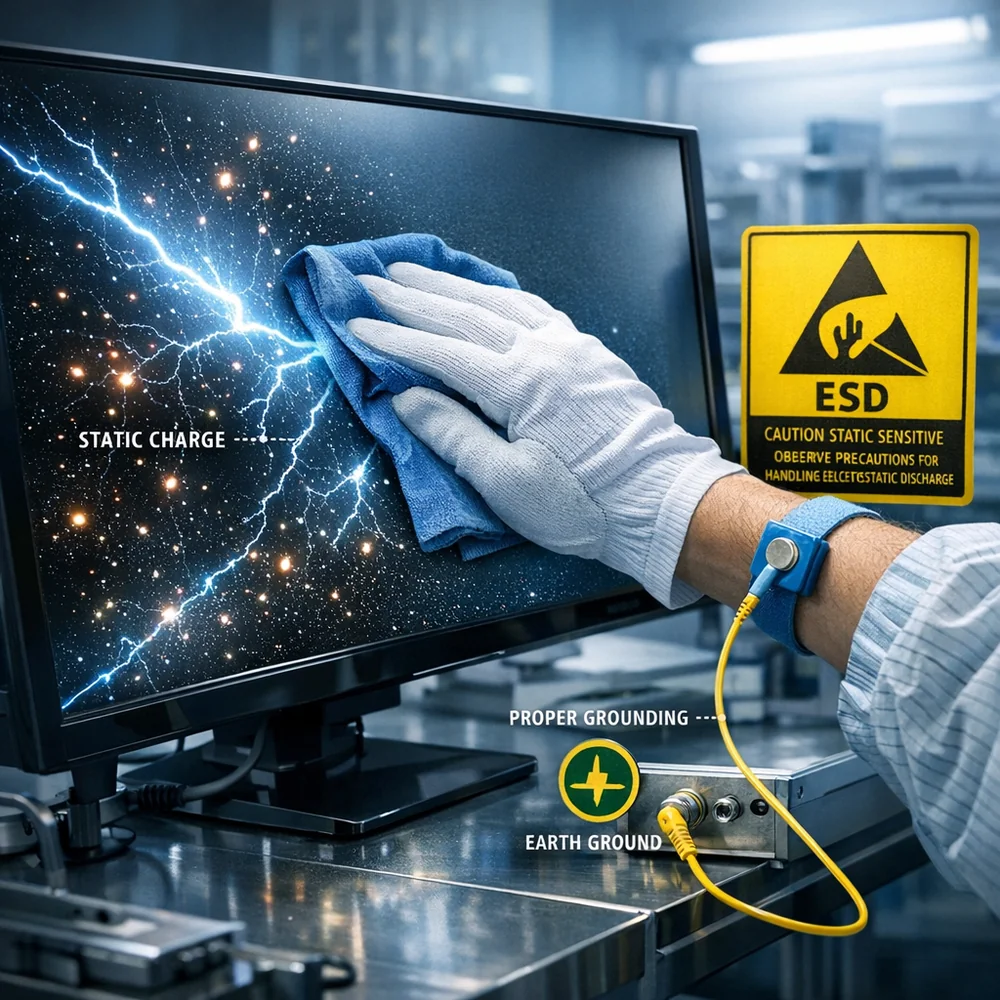
Since we mentioned static electricity with keyboards, let’s tackle why your TV seems to attract dust like a magnet. Large displays naturally build up static charge through the triboelectric effect as air moves across their surface. This charge literally pulls dust particles out of the air and holds them on the screen. Most standard dusting actually makes this worse by adding more friction.
The solution is using anti-static microfiber cloths that include conductive carbon threads to bleed away charge. Alternatively, dedicated anti-static screen sprays leave a microscopic conductive layer that prevents charge buildup between cleanings.
Room humidity also plays a major role.
In very dry environments, static charges remain more stable on surfaces. Maintaining 40 to 50 percent humidity with a humidifier allows static charges to dissipate naturally. By managing this invisible force, you reduce how often you need to clean, which in turn reduces cumulative wear on the coatings from repeated mechanical contact.
Key Insight: Static electricity acts as a constant pull for environmental dust on large displays. Utilizing anti-static microfiber textiles and maintaining proper ambient humidity levels neutralizes these surface charges, significantly reducing the frequency of potentially abrasive cleaning cycles.
The Cloth-First Rule: Preventing Moisture Damage
Building on everything we’ve covered, there’s one absolute rule that ties it all together. Never spray any liquid directly onto an electronic device. When cleaner hits a screen surface as droplets, it can run down into the bezel. Through capillary action, that liquid gets pulled into the internal circuitry. Once inside, it causes short circuits and corrosion that kill the device.
The cloth-first protocol is non-negotiable for electronics maintenance. Spray your cleaner onto the microfiber cloth until it’s damp, not wet.
Then use the cloth on the screen with gentle pressure. This approach is similar to cleaning mirrors in bathrooms. If you’re cleaning a device with exposed ports, consider covering them with tape first to create a physical barrier against accidental mist. For dusty crevices near ports, use a dry soft-bristled brush instead of any liquid. Every step should keep moisture on the textile and away from the electronics.
Key Insight: Direct spraying of liquids on electronics leads to moisture ingress through capillary action, causing internal corrosion and short-circuit failure. The “cloth-first” application rule is the mandatory protocol for ensuring that solvents stay on the optical interface and away from the electrical circuitry.
Conclusion
Cleaning electronics safely comes down to respecting what makes them different from regular glass surfaces. Those nano-thin coatings that manage glare and repel fingerprints are incredibly fragile. Ammonia destroys them. Alcohol strips them away. Even the wrong cloth can leave permanent scratches.
Invest in high-GSM microfiber specifically designed for screens. For wet cleaning, stick to pH-neutral, plant-based surfactant solutions with no fragrances or harsh solvents. Apply everything to the cloth first, never directly to the device. When you need actual sanitization rather than just cleaning, UV-C chambers offer a coating-safe alternative to alcohol wipes.
Manage the full environment around your electronics. Use anti-static materials and maintain proper humidity to reduce dust attraction. Clean keyboards and ports with compressed air and non-conductive tools to avoid static discharge. Treat your screens and devices as the precision optical instruments they are, and they’ll maintain their clarity and performance for years to come.
References
- Hustvedt, G., et al. (2012).
“Coatings and Polymer Degradation in Consumer Electronics: The Impact of Common Solvents.” Journal of Applied Polymer Science. 2. International Fabric Institute.
(2015). “Textile Density for Optical Surfaces: GSM and Particulate Entrapment.” IFI Technical Bulletin. 952.
1-12. 3. Smith, J.
A., et al. (2011). “The Efficacy of UV-C Radiation in the Sanitization of Mobile Devices.” Journal of Environmental Health.
- World Health Organization (WHO). (2019).
“Best Practices for Maintaining High-Resolution Medical Displays: Cleaning and Sanitization.” WHO Technical Guidance. 5. U.S. Environmental Protection Agency (EPA).
(2020). “Evaluating the Chemical Compatibility of Disinfectants with Modern Electronics Surfaces.” EPA Technical Bulletin.